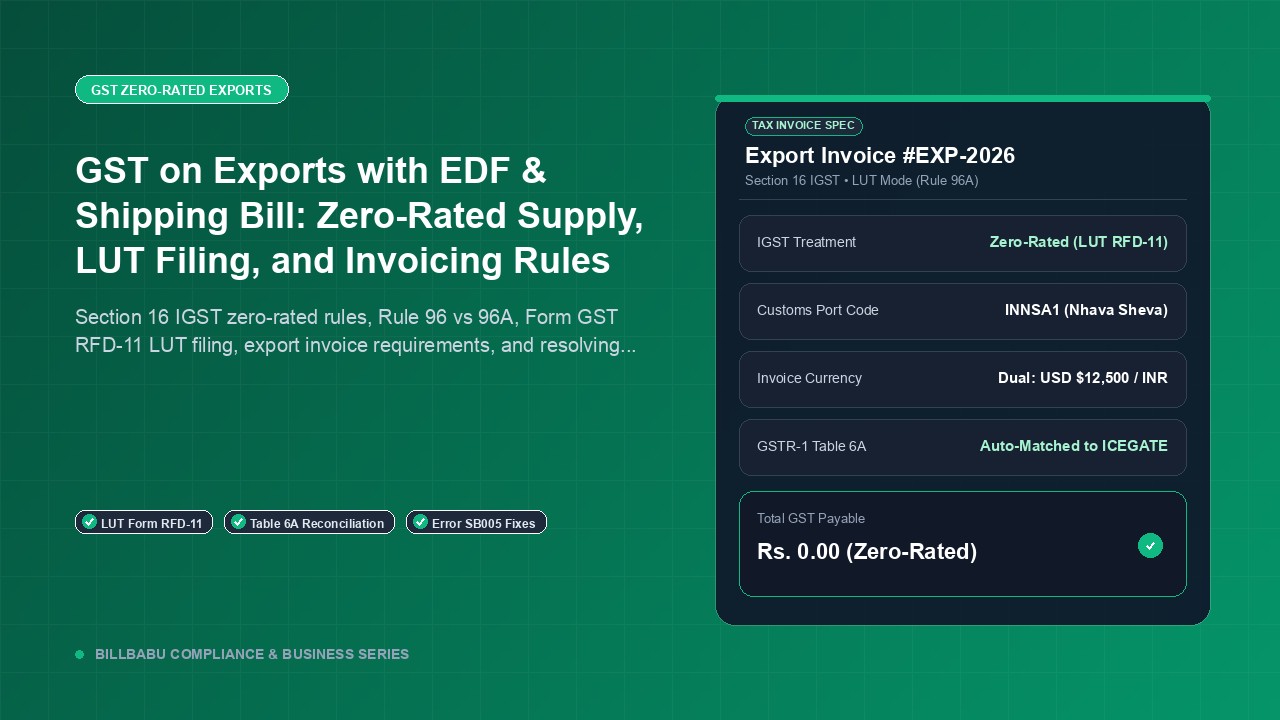
GST on Exports with EDF & Shipping Bill: Zero-Rated Supply, LUT Filing, and Invoicing Rules
Comprehensive guide to GST on exports in India: Section 16 IGST zero-rated rules, filing Form GST RFD-11 LUT, export tax invoice mandatory fields, and fixing ICEGATE SB005 errors.
BillBabu Team
BillBabu App Team
Under India's Goods and Services Tax framework, exports are not merely exempt supplies—they are designated as zero-rated supplies under Section 16 of the Integrated Goods and Services Tax (IGST) Act, 2017. This crucial distinction ensures that Indian exporters can compete in global markets without being weighed down by embedded domestic taxes. However, enjoying tax-free exports or recovering unutilized input tax credits requires strict adherence to statutory invoicing standards, Letter of Undertaking (LUT) procedures, and seamless integration between GSTR-1 and ICEGATE customs systems. Here is everything Indian exporters need to know about GST export compliance in 2026.
The Statutory Foundation: Zero-Rated Supplies under Section 16 IGST Act
To understand export taxation, it is critical to grasp how the GST law treats cross-border outbound supplies:
- Section 16(1) of the IGST Act: Defines "zero-rated supply" as any supply of goods or services or both for export, or the supply of goods or services to a Special Economic Zone (SEZ) developer or SEZ unit.
- Zero-Rated vs. Exempt Supplies: In an exempt supply (such as unprocessed agricultural produce), no GST is charged on outward sales, but the supplier is prohibited from claiming Input Tax Credit (ITC) on inputs and raw materials. In sharp contrast, a zero-rated supply applies a 0% tax rate on outward exports while explicitly permitting the exporter to claim 100% Input Tax Credit on all inputs, capital goods, and input services used in the business.
The Export Principle: The foundational doctrine of international trade law (and Indian GST) is that "taxes shall not be exported." Zero-rating ensures that all domestic taxes embedded in raw materials, packaging, freight, and professional services are refunded back to the exporter.
The Two Export Routes: Rule 96A (LUT) vs. Rule 96 (IGST Payment)
Under Section 16(3) of the IGST Act, every exporter of goods and services is given two distinct procedural routes to execute their exports:
| Compliance Feature | Route 1: Export under LUT (Rule 96A) | Route 2: Export on Payment of IGST (Rule 96) |
|---|---|---|
| Tax Outflow at Export | ₹0.00 (Zero working capital blocked) | Full IGST paid upfront (cash or electronic credit ledger) |
| Governing CGST Rule | Rule 96A of CGST Rules, 2017 | Rule 96 of CGST Rules, 2017 |
| Pre-requisite Filing | File Form GST RFD-11 annually on GST Portal | No prior bond/LUT needed; IGST paid in GSTR-3B |
| Refund Mechanism | Claim refund of unutilized accumulated ITC via Form GST RFD-01 | Automated refund of IGST paid via ICEGATE matching |
| Processing Timeline | Manual / semi-automated by GST jurisdictional officer (15-45 days) | Automated customs scroll credit to bank account (7-15 days) |
| Default Consequence | If goods not exported in 3 months, pay IGST + 18% interest | No default; tax already paid to government |
For over 90% of small and mid-sized exporters, Route 1 (LUT under Rule 96A) is the gold standard because it avoids tying up precious working capital in upfront tax payments.
Step-by-Step Guide: Filing Letter of Undertaking (Form GST RFD-11)
Filing an LUT is an entirely electronic, instant process conducted on the official GST portal:
- Eligibility Check: Any registered taxpayer can file an LUT, provided they have not been prosecuted for any offence under the CGST/IGST Act or existing laws where tax evaded exceeds ₹250 lakh.
- Navigation: Log into the GST Portal → Services → User Services → Furnish Letter of Undertaking (LUT).
- Select Financial Year: Select the applicable financial year (e.g., 2026-2027). Remember, an LUT is valid for one full financial year (1st April to 31st March) and must be renewed annually before April 1st.
- Statutory Undertakings: Check all three statutory declaration boxes:
- To export goods or services within 3 months from the date of the export invoice (or realization within 9 months for services).
- To observe all provisions of the GST Acts and rules.
- To pay integrated tax along with 18% interest per annum in case of failure to export goods within the stipulated period.
- Witness Details: Provide names, occupations, and residential addresses of two independent witnesses.
- Signing & Submission: Sign using the Primary Authorized Signatory's Digital Signature Certificate (DSC) or Electronic Verification Code (EVC OTP). An Application Reference Number (ARN) receipt is instantly generated.
Mandatory Fields on an Export Tax Invoice
An export invoice is subject to far stricter statutory standards than a domestic B2B tax invoice. Under Rule 46 of the CGST Rules, an export invoice must contain the following non-negotiable details:
| Invoice Field | Statutory Requirement & Format |
|---|---|
| Mandatory Header Endorsement |
If under LUT: "SUPPLY MEANT FOR EXPORT UNDER LETTER OF UNDERTAKING WITHOUT PAYMENT OF INTEGRATED TAX" If with tax: "SUPPLY MEANT FOR EXPORT ON PAYMENT OF INTEGRATED TAX" |
| LUT Reference Details | LUT ARN Number and Date of Filing on the GST Portal |
| Overseas Recipient Details | Name, Complete Overseas Address, Country of Destination, State Code marked "96 - Other Countries" |
| HSN / SAC Codes | Mandatory 6-digit or 8-digit HSN code for goods; 6-digit SAC code for services |
| Dual Currency Disclosure |
1. Value in Transaction Currency (e.g., USD, EUR, GBP) 2. Converted Equivalent in Indian Rupees (INR) using CBIC notified customs exchange rate under Section 14 of Customs Act |
| Customs Port & Shipping Bill Details | 6-character ICEGATE Port Code (e.g., INNSA1), Shipping Bill / EDF Number, and Date |
GSTR-1 Reporting: Mastering Table 6A (Exports)
When filing your monthly or quarterly GSTR-1, export invoices must be reported under Table 6A (Export Invoices). Never mix export sales with domestic B2B sales in Table 4A!
Table 6A Data Capture Requirements:
- Export Type: Select either "WOPAY" (Without Payment of Tax - LUT) or "WPAY" (With Payment of Tax - IGST).
- Invoice Details: Invoice Number, Invoice Date, and Total Invoice Value (in INR).
- Port Code: The exact 6-character alphanumeric code of the customs port (e.g., INMAA1 for Chennai Sea, INDEL4 for Delhi Air Cargo).
- Shipping Bill / Bill of Export Number & Date: Mandatory for goods. (Leave blank only for service exports where no physical shipping bill exists).
- Taxable Value & Applicable Tax Slab: Enter the taxable amount against the applicable GST 2.0 slab (0%, 5%, 18%, or 40%). For WOPAY, the integrated tax column will automatically reflect ₹0.00.
Resolving Common ICEGATE Mismatch Errors
When exporting on payment of IGST (Route 2), the GST portal transmits Table 6A data to ICEGATE. If data mismatches occur, ICEGATE halts automated refunds. Here are the most common error codes and their remedies:
| Error Code | Root Cause of Rejection | How to Rectify |
|---|---|---|
| SB005 | Invoice Number, Shipping Bill Number, or Port Code in GSTR-1 does not match ICEGATE records. | File an amendment in Table 9A of subsequent GSTR-1 to correct the invoice number, shipping bill number, or port code to match ICEGATE exactly. |
| SB006 | Gateway EGM (Export General Manifest) not filed or mismatch in vessel/container details. | Coordinate with your shipping line or Customs Broker to file the supplementary Gateway EGM at the transit port. |
| SB001 | Invalid GSTIN or PAN mismatch between ICEGATE profile and GST registration. | Update your IEC profile on the DGFT portal and update bank account details on ICEGATE through the Customs Helpdesk. |
| SB002 | Export invoice not transmitted by GSTN to ICEGATE due to return validation failure. | Verify that GSTR-3B tax payment exactly equals or exceeds the tax declared in GSTR-1 Table 6A; check GSTN transmission logs. |
Checklist for a Bulletproof Export GST Audit
- Maintain active LUT filing for the current financial year before issuing the first export invoice of April.
- Ensure every export invoice carries the mandatory statutory endorsement text and foreign exchange conversion calculation.
- Verify that your bank account is validated in PFMS (Public Financial Management System) on ICEGATE for direct electronic credit of customs refunds.
- Retain copies of the commercial invoice, packing list, bill of lading, shipping bill, and bank IRM in a dedicated electronic folder for at least 72 months (6 years).
Frequently Asked Questions (FAQ)
1. Can I issue an export invoice without a Shipping Bill number?
Yes. Commercial export invoices are typically issued before the cargo arrives at customs or before the customs broker files the Shipping Bill on ICEGATE. You can issue the invoice with your LUT reference and add the Shipping Bill number and Port Code once generated, prior to filing GSTR-1 Table 6A.
2. What foreign exchange rate should be used on export invoices for GST?
For GST purposes on goods export invoices, use the CBIC notified exchange rate determined under Section 14 of the Customs Act, 1962 in force on the date of filing the shipping bill. For service exports, use the RBI reference rate or prevailing market spot rate on the invoice date.
3. What happens if goods are not exported within 3 months of issuing an LUT invoice?
Under Rule 96A(1)(a), if goods are not exported within 3 months from the invoice date, the exporter must deposit the applicable IGST along with 18% annual interest within 15 days following the end of the 3-month period. Once exported, the tax paid can be claimed back as a refund.
Create Audit-Ready Export Invoices with BillBabu
Never risk customs rejections or delayed GST refunds. BillBabu gives you pre-built zero-rated export invoice templates, automatic LUT endorsement stamping, multi-currency conversion, and one-click GSTR-1 Table 6A export logs that match ICEGATE standards.
Start Free with BillBabuTags
Related Articles
GST invoicing made easy for Indian small businesses
Create GST-compliant invoices & estimates, track payments, manage parties and inventory — all from your phone. 14-day free trial, no credit card needed.